Work That Picks Itself Up
AI assistants are good at the work and bad at finding it. The ticket, the requirement, the platform it touches and the person who owns it all sit in DemandFlow. Now the assistant can read them, act on them, and write the result back, without anyone copying anything into a chat.
An AI assistant will draft the reply to a ticket, write the code for a requirement, or tell you which platforms need attention this quarter. What it cannot do is find any of that on its own. So someone copies the ticket into the chat, pastes the requirement into the prompt, exports the platform list and pastes that too. The assistant is fast. The fetching around it is the old re-keying problem with a new name.
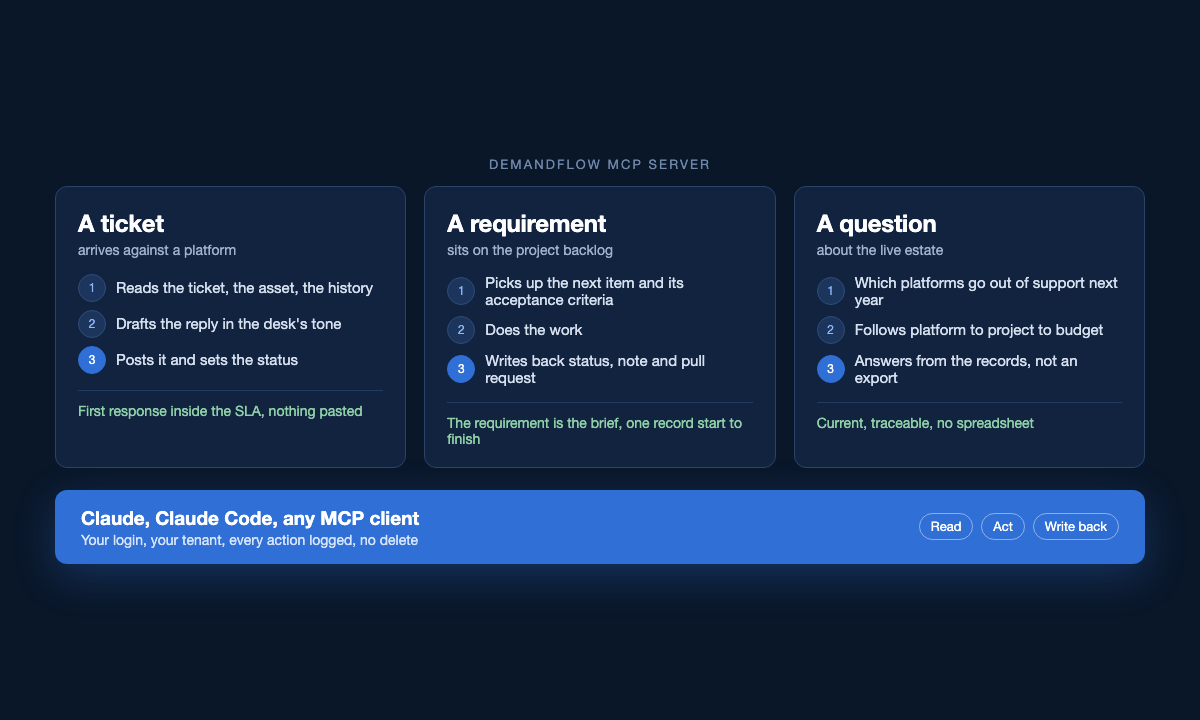
DemandFlow® now has an MCP server. The assistant reads DemandFlow records for itself, acts on them, and writes back what it did. Claude, Claude Code and any other MCP client connect to it with your own login. Here is what that changes.
Tickets get answered with the history in hand
A ticket arrives against a platform. The engineer asks Claude what it is about. Claude reads the ticket, the asset it names, the other open tickets on the same platform, and what was said the last time this customer raised something similar. It drafts the reply in the tone the desk uses. When the engineer is happy with it, Claude posts it to the ticket and sets the status.
Nothing was pasted. The engineer did not open four screens to assemble the context. The first response goes out inside the SLA with the history behind it, and the ticket shows exactly what was sent and when.
Requirements get picked up and acted on
A project’s requirements live on its backlog as items with acceptance criteria. A coding agent connected to DemandFlow picks up the next item, reads what done looks like, does the work, and writes back: the status, a note on what changed, the link to the pull request. The product owner watches progress on the same board the team already uses.
The requirement is the brief. There is no separate prompt document to keep in step with the backlog, and the record of what was asked and what was delivered is one record, not two.
The same holds for change requests, orders and hardware requests. If the work is described in DemandFlow, an assistant can read the description, act on it, and leave the evidence where the next person will look for it.
Questions get answered from the live estate
Which platforms go out of support next year, and which projects refresh them. Which of next year’s roadmap lines have no project attached. What this project has spent against what was approved. Which suppliers have an assessment older than twelve months.
Each of these used to be two grids, two filters and a spreadsheet. Now it is a question. The answer is current, because it came from the records and not from an export made last Tuesday.
Why it works
An assistant is only as useful as the context it can reach, and in DemandFlow the context is already joined up. A ticket knows its asset. The asset knows its platform. The platform knows its owner, its lifecycle dates, the project refreshing it and the budget line paying for it. The assistant follows those links the way a person would, in seconds rather than an afternoon.
It also understands what the records mean. Before it answers an unfamiliar question, the assistant reads the definition of the entity it needs: the fields, what they hold, how the record links to others. That is the same definition the application is built from, so a field you added to your tenant last week is visible to the assistant this week.
Actions land where they belong
When the assistant creates or updates a record, the change goes through the same route as any integration, so validation, versioning and history all apply. Every call is logged: who made it, which tool, which records. Each person connects with their own token, created under their profile and switched off in a click, and a token sees one tenant only. There is no delete. The assistant is a named user in the audit trail, not a back door.
Connecting takes two minutes
Create a token under Profile, then PAT Tokens. In Claude, add DemandFlow as a connector and sign in with the token when asked. In Claude Code, one command does the same. From then on the assistant knows where the work is.
The best assistant is the one that already knows what you are working on. Now it does.