
CRM and Outbound Campaigns
A CRM that knows the business behind the deal.
Contacts, accounts, leads, pipelines, deals, quotes and e-signature in the same platform as the services you sell, the contracts that bill them and the projects that deliver them. Outbound campaigns fill the top of the funnel from your own mailboxes and stop the moment a prospect replies.
The Challenge
The pipeline is in one tool, the sequences in another, and the customer is somewhere the sales team cannot see.
A standalone CRM knows the deal and nothing else. The quote is a document, the signature is a third service, the outbound sequence runs in a separate tool with its own contact list, and the services, contracts and projects the customer already has live in systems the account owner never opens. Every handover is a re-key, the forecast is a spreadsheet, and the follow-up that was due today is a memory.

A disconnected pipeline
Deals, quotes and signatures in three places, so the forecast is assembled by hand and the quote on file is never quite the one that was signed.

Outbound in a silo
Sequence tools keep their own lists and their own consent records, send from mailboxes nobody monitors and keep emailing prospects who have already answered.

A customer the CRM cannot see
ARR, service contracts, customer services, project status and the changes that affect the customer all sit outside the account record.
Pipeline
A pipeline you can read at a glance, and a forecast against quota
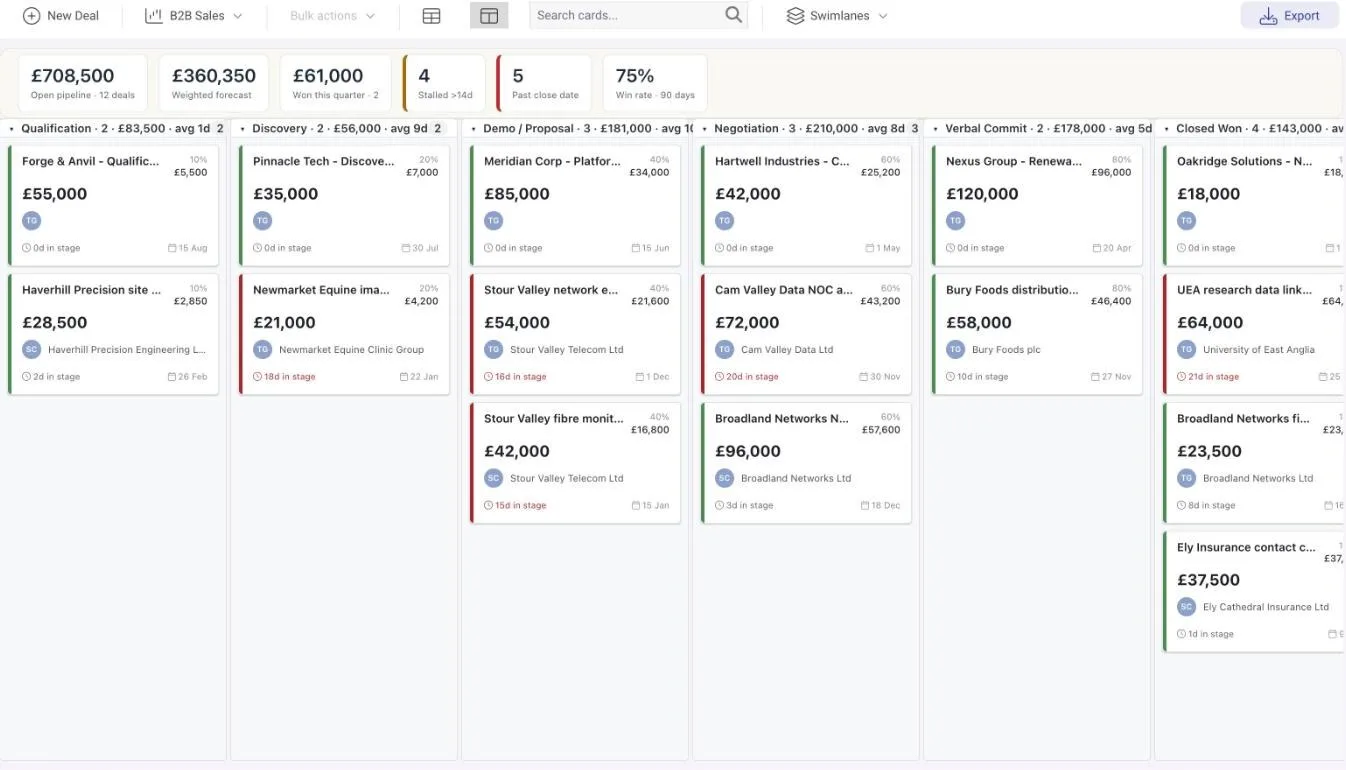
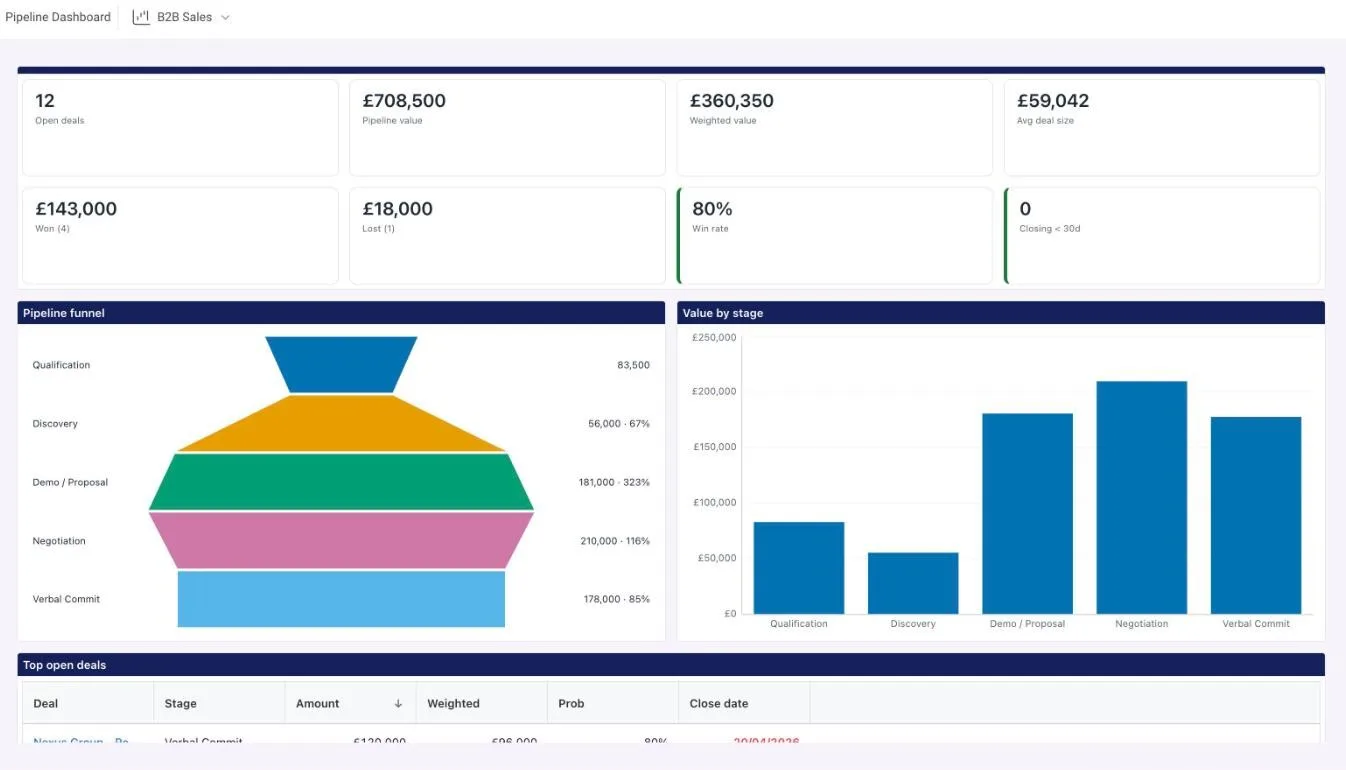
Each pipeline defines its own stages with probabilities, swimlanes and custom fields, so a quick-close SMB pipeline and an enterprise pipeline run side by side. The deals kanban shows open pipeline, weighted forecast, won this quarter, stalled deals, deals past their close date and the 90-day win rate above the columns. The pipeline dashboard adds the funnel, the stage breakdown and the top and overdue deals, and the forecast sets weighted pipeline by month and owner against each owner’s quota, with a stale deals tab to clear before the review.
- Five deal types: new business, renewal, upsell, cross-sell and resourcing
- Every stage change recorded with days in stage, feeding the stalled count, deal health and the stale deals tab
- Sales quotas per owner by month or quarter, in amount and deal count
Deals and quotes
From deal health to a signed quote without leaving the page
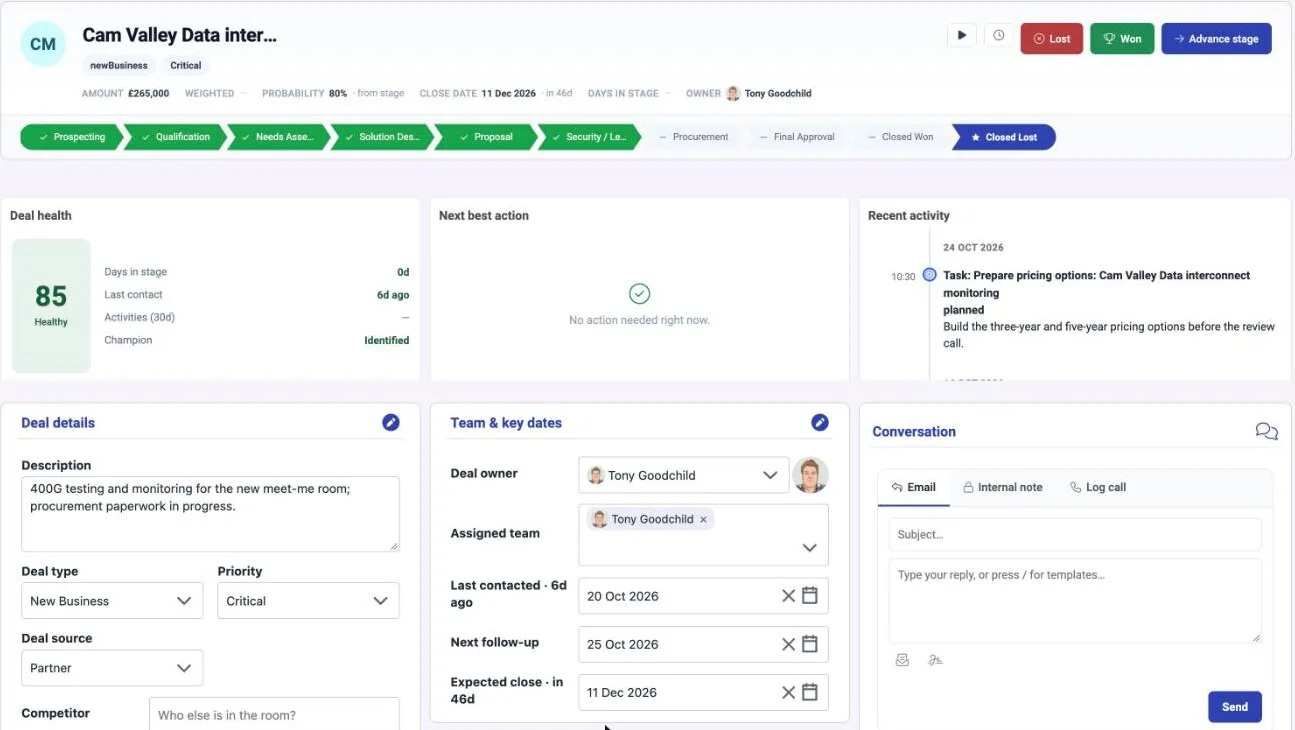
A deal page shows the stage track, amount, probability, close date and owner, a deal health score built from days in stage, last contact, recent activities and whether a champion is identified, a next best action and the recent activity. The Conversation panel sends an email from the user’s own Microsoft mailbox, writes an internal note or logs a call, and every one of them lands on the timeline. Create quote builds a versioned quote from the deal’s products with a PDF, and Send for signature raises a DemandSign envelope with the deal contact as signer and writes the outcome back.
Deal health
Days in stage, last contact, activities in the last 30 days and champion identified, scored on the deal.
Timeline
Activities, tracked emails, message events, notes and stage changes merged into one feed on every contact, company, lead and deal.
Quotes
Versioned from deal products; draft, sent, accepted, rejected, superseded or expired; PDF and DemandSign signature.
Calendar sync
Each user connects Microsoft 365 or Google so meetings with matched contacts become activities automatically.
Leads and lists
Leads that arrive scored, lists that know who can be emailed
A lead form embeds in any website with consent text, a captcha, a per-hour limit and allowed domains; a submission creates the contact and lead with consent captured, and a repeat submission for an open lead logs an activity instead of a duplicate. Scoring rules award fit and engagement points for field values, activities, messages, recency and open deals, and a nightly run bands every open lead and account hot, warm or cold. Convert lead creates the contact, account and deal and keeps the lead linked. Lists are static or smart, and Check a send shows who the guard would skip before a bulk email goes.
- My day: each owner’s due and overdue follow-ups, overdue tasks and new replies, with Done and Snooze on the row, and a daily in-app reminder
- Duplicates: likely duplicate contacts and companies merged side by side, keeping activities, deals and list memberships
- Prospecting: find people on a list by department, seniority and job title through Hunter.io and verify emails in bulk
Outbound campaigns
Up to four steps in one thread, from your own mailboxes, stopped on reply
A campaign targets a list, sends from one connected Microsoft 365 account or a group of them, and runs a first email plus up to three follow-ups in the same Outlook thread. Each account has its daily cap, send window, gaps between sends and ramp-up, and a health check for its token, SPF, DKIM, DMARC and seven-day bounce rate. A subscription on each mailbox delivers replies and bounces straight back: the recipient is marked, an activity is logged, the owner is told in the app and the campaign counters update. Stop on reply is always on.
Campaign page
Audience, Steps, Schedule and accounts, Launch and Results tabs with preview, test send, launch, pause, resume and stop.
Consent guard
Opt-outs win, tenant daily caps apply, sole traders and recipients without a company need express consent, and the unsubscribe link records the opt-out.
Results
Recipients, sent, replied, bounced, opened, clicked, unsubscribed and skipped per campaign, with open and click tracking switched on per campaign when wanted.
Verify before send
Addresses checked before the first email leaves, so bad addresses are skipped rather than bounced.

One record from first touch to ARR
The customer the CRM can see
- A won deal’s client holds its service contracts, whose lines roll up to ARR on the client record
- Customer reporting shows the client’s project KPIs, RAID, financials, milestones and timeline, with a QBR launcher
- The customer services it buys sit in the network model, so a network change lists the customers and services it affects
- Companies can be pushed to HubSpot and accounts pulled from Dynamics 365 with their related entities
- Every CRM record is a DemandFlow record: the same automations, imports, REST API, webhooks and assistant tools apply
One Platform. Strategy to Stack.
Ready to Take Control?
Join the leading companies who have transformed their technology management with DemandFlow®.
Book a personalised demo today.