
DemandFlow® for technical recruitment agencies
The ATS that already speaks your sector’s language.
Built for agencies placing technical contract and permanent staff into telecom, utilities and infrastructure. The flow runs from a won sale to a placed contractor on one record: the vacancy, its rate card, its extracted requirements, every applicant, every interview, every document issued and every onboarding task, with AI doing the reading and a recruiter making the decisions.
The Challenge
A generic ATS does not know what a fibre splicer is
Technical recruitment has a shape that generic applicant tracking systems were not built for. Certifications gate whether a candidate can be presented at all. Skills need sector specific levels, not free text. Contract placements carry rate cards, umbrella companies and a Key Information Document the law requires before terms are agreed. Most agencies bolt all of this onto a generic ATS by hand and run the real business in spreadsheets and email.

Credentials in a notes field
A certification you cannot search by is a certification you cannot sell. When every credential is free text, MEF-CECP and Mplify CECP are two different things, and the shortlist misses the right people.

Compliance chased by email
Background checks, identity and the Key Information Document live in inboxes. When the client asks for evidence, or a dispute asks what was actually issued and when, someone goes looking.

The client hears nothing back
Four CVs go out as attachments. Nobody knows whether the client opened them, which candidate they liked, or why the role went quiet.
Sale to vacancy
A won deal raises its own vacancies
A resourcing deal carries a roles list: three RF engineers in the UK, one SCADA specialist in Ireland. The moment the deal is won, one vacancy is created for each line, with the number of positions as a field on it. It runs server side, so it fires whether the deal is won by a button, dragged to a won stage, patched by an import or closed by another automation, and it never raises the same vacancy twice.

One requirement, many positions
A line saying three engineers becomes one vacancy with three positions, not three vacancies. The vacancy is the requirement; the count is a field.

Fired by the record, not the button
The automation hangs off the deal changing state, so every route to a won deal raises the vacancies, and a deal saved twice does not double them.

The clock starts at receipt
Time to place is measured from the date the client told you, not the date the record was keyed, so the number measures your service rather than your data entry.
Rate cards
Apply the client’s rate card and the role data follows
A rate card is one job title and rate for a client, a country and a currency. Applying it to a vacancy sets the job title, currency, country, charge rate and rate unit in one action. A client’s rates are grouped by region or sheet, so a long rate sheet is two short picks rather than one long list. Fields edited by hand afterwards stay as edited until the card is applied again.
- Job title, currency, country, charge rate and rate unit set from one record
- Rates grouped by region or sheet for each client
- The rate card feeds the Key Information Document and the placement’s commercial terms later
AI requirement extraction
Paste the client’s spec, get structured requirements
A client sends a requirement as a document or an email. DemandFlow® reads it and writes the required skills and certifications onto the vacancy as structured rows, each with a level and a weight, or creates a draft vacancy from the spec when the role is new. The text box is pre filled from the vacancy where a specification already exists, and the extraction is safe to run twice.

New from spec
A client requirement becomes a draft vacancy with its skills and certifications already structured, ready for the recruiter to confirm.

Extract onto an existing vacancy
For a vacancy the recruiter already has open, the button writes the skill and certification rows and touches none of the vacancy’s own fields.

Editable before it runs
A migrated description is often the advert rather than the spec. The recruiter can trim the marketing before parsing.
Curated credentials
A credential catalogue, not a skills list
Skills and credentials are different things, and DemandFlow® treats them differently. A skill is a capability with a level. A credential is a specific certification issued by a specific body, and it is resolved against a shared, curated catalogue of awarding bodies and their certifications. The same resolver runs on both the CV and the job spec, so a candidate’s certification and a vacancy’s requirement land on the same catalogue entry and can be compared like for like.

One catalogue, both sides
The credential as written on a CV and the credential as written in a spec resolve to the same id. Matching compares catalogue entries, not strings.

Variants and acronyms handled
The resolver knows that a bare acronym, a renamed body and a reworded certificate can be the same credential, and it is tested against the real catalogue, not invented examples.

Clearance as a claim, not a fact
Security clearance read from a CV is recorded as a candidate claim until verified, and is used as a filter the recruiter switches on, never silently as a score.
AI candidate matching
Score the whole database against one vacancy
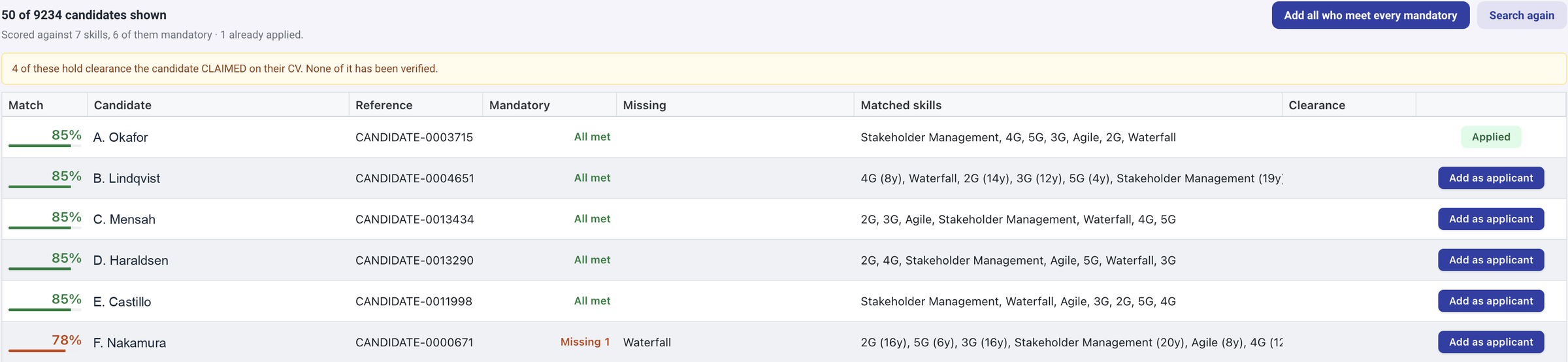
The Matches panel on a vacancy scores every candidate against the vacancy’s stated skills and credentials, because those are the two axes the data supports on both sides. Availability is deliberately not scored: most CVs do not state a notice period, and filtering on an empty field would hide the database rather than match it. Clearance is a filter the recruiter applies. The result is a ranked list a recruiter can act on, with the reasons visible.
- Skills and credentials scored against the same catalogue the vacancy uses
- Clearance applied as a recruiter controlled filter
- Runs on demand from the vacancy, or as a scheduled sweep across open roles
50 of 9,234 candidates scored against one vacancy, mandatory skills first, with claimed clearance flagged until verified.
Publishing
To LinkedIn and your careers portal, reviewed before anything goes out
One action drafts the LinkedIn post for a vacancy. The model summarises the role; the facts a candidate must not miss, the position type, the country, whether clearance is needed and the apply link, are assembled from the vacancy record rather than left to the model. The draft opens in the normal post editor, scheduled for the next weekday morning, so the recruiter reviews, edits and times it like any other post.
The apply link goes to the agency’s own careers portal: a public site on its own subdomain listing open vacancies, each with a detail page, an application form with the vacancy’s screening questions, CV upload and an RSS feed a client can embed on their own site.

LinkedIn post drafted, never auto sent
The scheduler only dispatches a post whose time has passed. The draft waits for the recruiter.

Careers portal on your subdomain
Open vacancies, detail pages, screening questions and CV upload, with your branding and nothing to host.

Embeddable feed
An RSS feed of open vacancies so a client or a partner site can list your roles without a build.
Application vetting
Deterministic knockout, advisory AI score, recruiter decides
Two separate things happen when an application arrives, and they are kept separate on purpose. The screening questions marked as knockout are evaluated deterministically: fail one and the application is marked knocked out with the reason recorded, the candidate receives a decline, and the vacancy team is told. Separately, an AI score reads the job description, the required skills, the candidate’s stated skills and profile and the screening answers, and returns a score with a rationale.
The AI score is decision support for a human recruiter. It never rejects anyone automatically. Recruitment screening is high risk under the EU AI Act, so the design keeps a person in the loop and an auditable rationale on every assessment.

Knockout you can explain
A rule either passes or fails. The failed questions are recorded on the application, so the reason is never a mystery.

A score with a reason
The AI assessment carries its rationale and is logged with its cost, so the recruiter sees why, not just how much.

Never an automatic reject
Advisory only. Whether a candidate advances stays a recruiter decision, by design.
Video interviews
Recorded answers, with an authenticity check
A vacancy can carry video questions. After applying, the candidate records a short answer to each in the browser, with a countdown to prepare, a time limit and retakes. Knocked out applicants skip it. Each answer is transcoded, still frames are captured, and two checks run: a vision model looks for signs of AI generation, deepfake or face swap, and face detection confirms a single consistent real face throughout. The combined verdict is written to the response as a flag a recruiter reviews.
- Questions per vacancy, with preparation countdown, time limit and retakes
- Vision model and face detection produce a clear, review or suspect flag
- Advisory only: a human recruiter always reviews the answer
Interviews
Invites from your own mailbox, scorecards from the vacancy
Interview invites go to the candidate and the interviewers from the recruiter’s own Microsoft mailbox, so replies come back to them, with add to calendar links and an attached calendar file. The scorecard is pre created with one row per required skill for each interviewer, carrying the skill’s weight and mandatory flag, and the ratings are weight averaged. The scores are typed by people; nothing here calls an AI, and the average never moves the application on its own.
- Invites with calendar links from the recruiter’s own mailbox
- Structured scorecard per interviewer, one row per required skill
- Weighted average surfaced on the interview, decision stays with the recruiter
CV standardisation
A standard format CV, templated, versioned and anonymised on demand
One document renderer with a template per document type produces the standard format CV, the presentation coversheet, the Key Information Document and the status determination output from DemandFlow® data. A template editor with preview lets the agency shape its own layout. Generating a CV is not a preview: every run writes a new versioned PDF to the candidate’s document list and nothing is ever overwritten, so the question of what was actually sent, months later, has an answer.
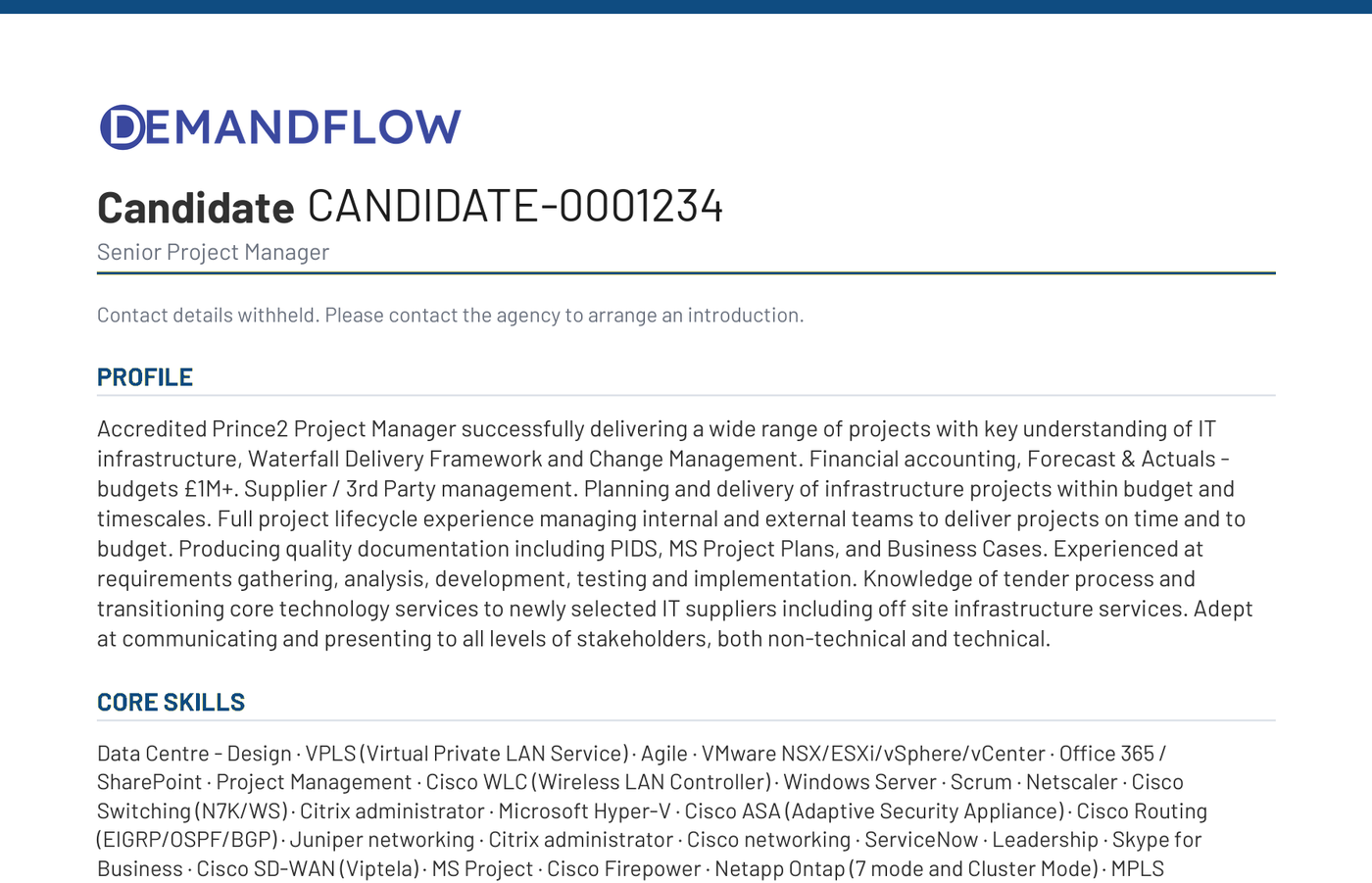
Anonymisation is asked every time rather than remembered. Suppressing the name, contact details and current employer is what stops a client approaching a candidate directly, and it is a decision about this send.
Your template
Shape the standard CV in the template editor and preview it without writing anything.
Immutable issues
Every generated document is a new version appended to the record. What you sent is what is on file.
Anonymise per send
Name, contact details and current employer suppressed when you choose, for the shortlist in front of you.
An anonymised standard format CV: a candidate reference in place of the name, contact details withheld.
Client presentation portal
One link replaces four attachments, and you know when it was opened
Build a client presentation from a vacancy’s shortlist in one action. It is created as a draft so the recruiter writes the covering message, sets anonymisation, checks the CVs and presses Send themselves; sending issues a login to a real client contact and exposes personal data, and that is a human decision. The client then opens one tokenised, read only page: the vacancy, the shortlist, each candidate’s CV named or anonymised, the recruiter’s rationale, a recruiter video introduction and a per candidate video.
The client answers per candidate, interested, not interested or request interview, and the answers land straight back on the presentation record in DemandFlow®. A presentation can be withdrawn at any time.
Draft first, send deliberately
The shortlist becomes a draft presentation. The recruiter reviews everything before a client sees anything.
Rationale and video
Why each candidate is on the list, in the recruiter’s words and on camera, alongside the CV.
Responses on the record
Interested, not interested or request interview, per candidate, written back to DemandFlow® with the response time.
Key Information Document
The KID issued before terms are agreed, every version kept
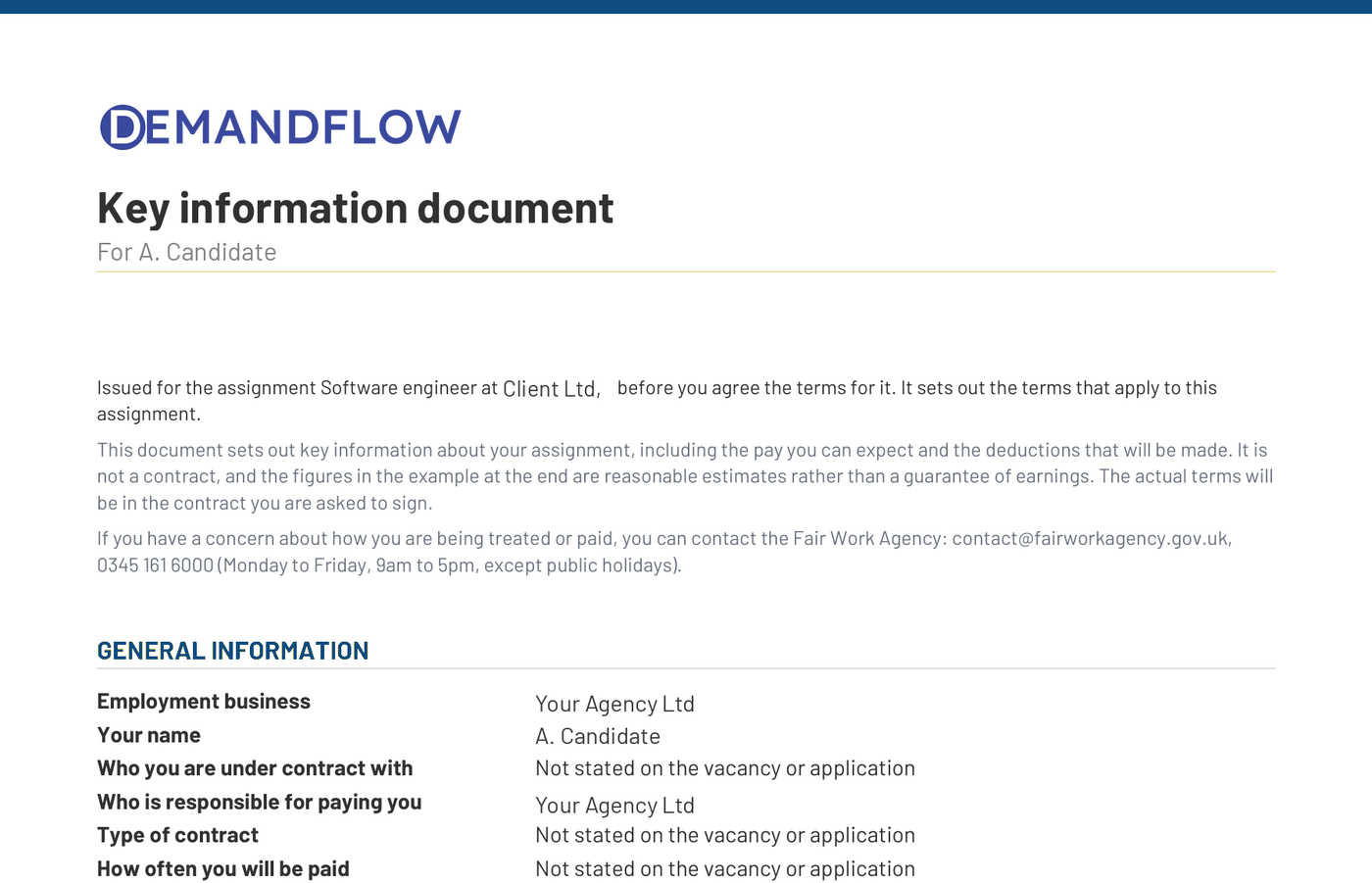
Regulation 13A requires the Key Information Document to reach the work seeker before the terms on which they will be found work are agreed. That is one person on one vacancy, so the KID is issued from the application. It reads the vacancy for the rate, hours and days and the application’s Key Information panel for the pay route, umbrella company, fees and benefits. Sending an offer is hard blocked until the KID has been issued. A change after placement, such as a move to a different umbrella mid assignment, issues an updated KID from the placement.
Wording is configured per agency and signed off by an administrator, and every issue appends a new version to the record, so what was given, and when, is the evidence if it is ever disputed.
- Issued from the application, before terms are agreed, as the regulation requires
- Send offer is blocked until the KID exists; create placement asks before overriding
- Per agency wording with administrator sign off, every version retained
A generated Key Information Document, issued and versioned before terms are agreed.
Offer, placement and onboarding
From accepted offer to a contractor on site, with the checks in the workflow
Creating a placement from an accepted offer checks the KID and any failed background check, fills the placement from the offer, the application’s pay route and the vacancy’s commercial terms, moves the vacancy’s filled count, stamps the application placed and moves other open applicants to the talent pool rather than rejecting them. Onboarding starts straight away from the matching profile.
An onboarding profile is matched by position type, country and client and creates one task per item. Background and identity items raise a check, with status requested, linked to the task; a candidate’s existing passed and unexpired check of the same type is reused rather than raised again. An e signature pack item creates a draft envelope bound to the candidate for the recruiter to review and send. A going live gate confirms the checks before the start.
Identity and background checks as tasks
Raised by the onboarding profile, tracked with status and expiry, reused when already held, and gated before going live.
Documents to sign, drafted not sent
Contract packs become draft e signature envelopes bound to the candidate. A person reviews and sends.
Talent pool, not rejection
When a vacancy fills, the other applicants move to the talent pool and nobody is emailed a rejection.
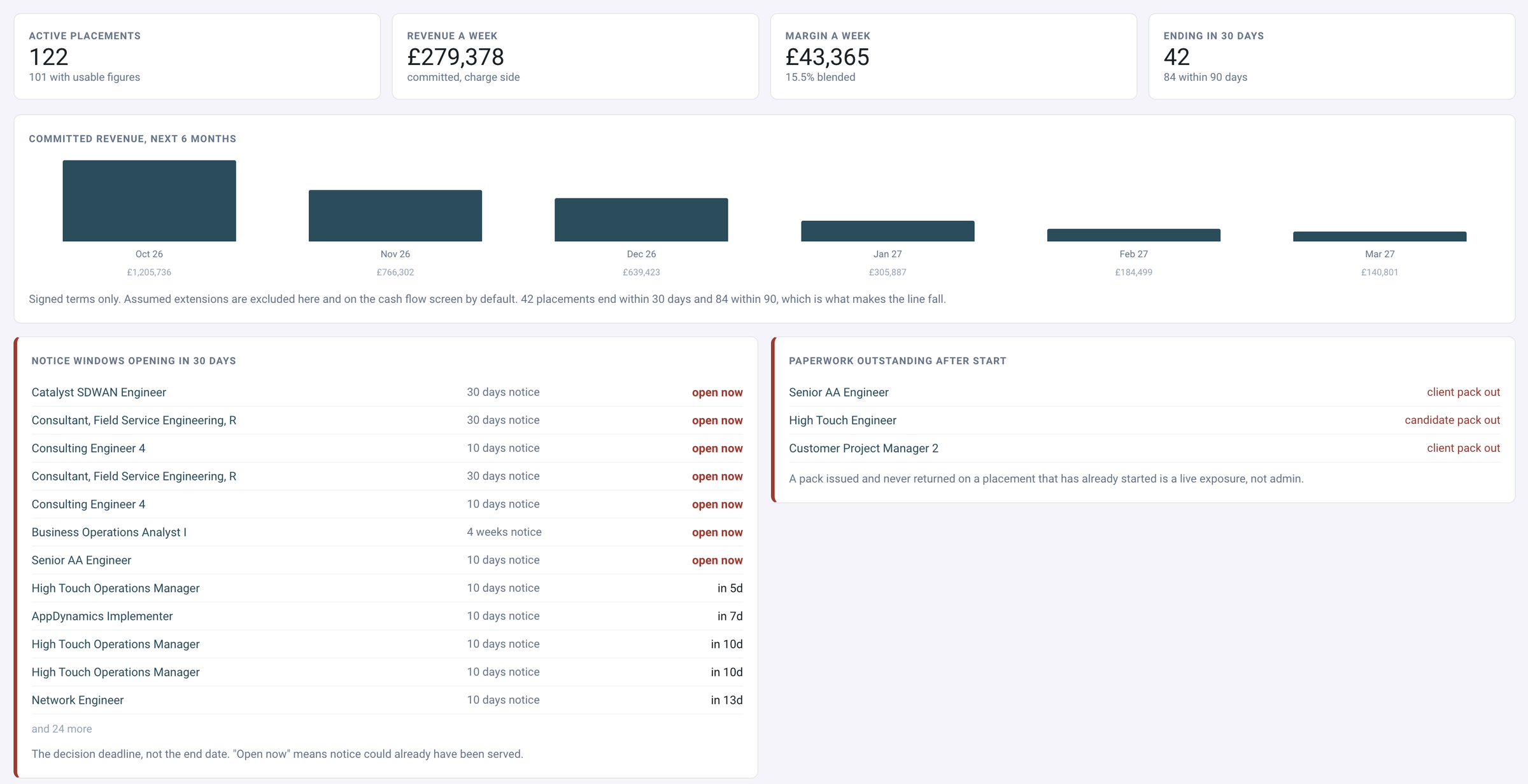
Active placements: weekly revenue and margin, committed revenue, notice windows opening and paperwork outstanding after start.
Contractor portal and cash flow
Timesheets and expenses from the worker, forecast across the book
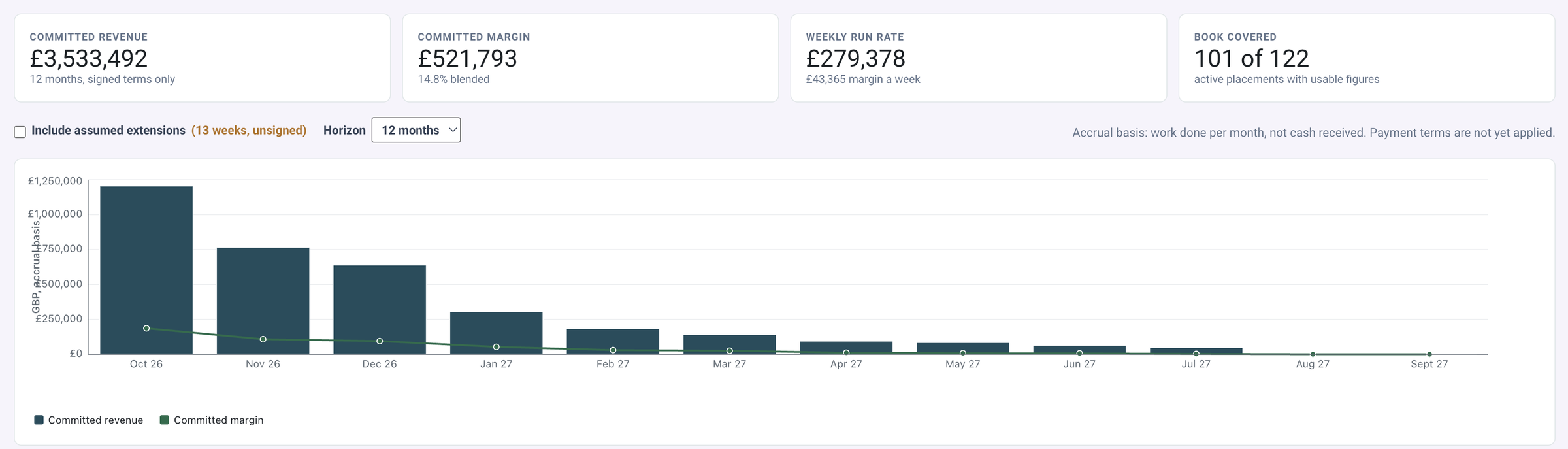
A placed contractor opens a signed link to see their placement, submit a timesheet for each period and file expenses with receipts. The placement is read from the signed link and never from the form, and every record is built server side, so hours, amounts and free text are the only things a worker controls. Across every active placement, the cash flow forecast reads rate, term and umbrella arrangement, so margin is visible at placement, not at the invoice run.
- Worker portal for placement summary, timesheets and expenses with receipts
- Cash flow forecast across the contractor book
- Pipeline dashboard with time to place reported three ways: to first submission, to placement, to start
Committed revenue and margin over twelve months on signed terms, with the weekly run rate.
One record. From the won deal to the contractor on site.
Rate cards, extracted requirements, catalogue matched credentials, a careers portal, knockout screening, advisory AI scoring, video interviews with an authenticity check, standardised and anonymised CVs, a client presentation portal, the Key Information Document, identity and background checks, onboarding and a contractor portal. All on the DemandFlow® platform, with definitions your team edits, a complete API and automations you build yourself.
One Platform. Strategy to Stack.
Ready to Take Control?
Join the leading companies who have transformed their technology management with DemandFlow®.
Book a personalised demo today.